In 4 easy steps you can get full access and control of your documents.
Bring everything together.
Connect your accounts and upload your important documents. Nishchint does the rest.
Connect your accounts
Automatically identify important documents from Gmail.
Smart categorisation
Insurance, warranties, medical records, registrations and more.
Upload documents
Add PDFs, scans and images directly.
Search instantly
Find what you need when you need it.
Know what matters.
Nishchint reads, understands and simplifies your documents so you don't have to.
Key details extracted automatically
Coverage, premiums, nominees, expiry dates and more.
Important clauses highlighted
Understand what you’re entitled to and responsible for.
Easy and clear explanations
No legal jargon. No searching through pages.
Ask questions
Get answers directly from your documents.
Stay ahead of what matters.
Get reminded. Stay updated. Take action, before it's too late.
Nishchint is reading
Going through your inbox right now.
I'll tell you what I find before you need to ask.
Turn documents into conversations.
Ask Nishchint anything about your files, in plain words. No digging through pages.
How much am I covered for?
When does this expire?
What am I responsible for?
See the app in action
Swipe through actual app screens.
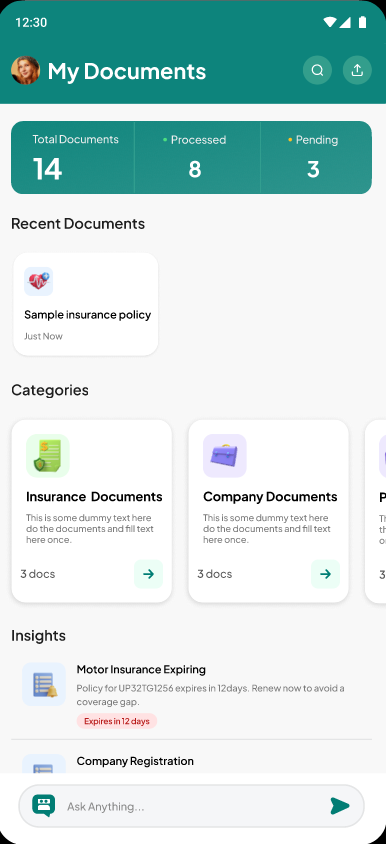
See all your documents at a glance - total count, processed and pending. Categorised view with recent documents and insights.
Frequently Asked Questions
How does Gmail sync work?
You grant read-only access to your Gmail. Nishchint identifies documents like insurance policies, bank statements and KYC docs, then securely stores them in your vault.
Is my data safe?
Yes. Your documents stay private and secure. Nishchint is built with privacy and security at its core.
Your documents are protected with AES-256 encryption and processed only by automated systems, never viewed by a person. They are stored in a private, locked-down cloud environment and are never publicly accessible. Access to your files is controlled through time-limited links that expire.
If you connect Gmail, Nishchint has read-only access. It can find and import your documents, but it cannot send, delete or modify anything in your inbox.
You can disconnect Gmail anytime.
And your data remains yours. Delete your account and everything in it, anytime. Or download a copy of your data whenever you want. Your phone's own security protects the app too, using your device's fingerprint, Face ID or passcode.
You decide what you share. Your documents stay yours.
What document types are supported?
Insurance policies, medical records, property documents, tax filings, KYC and registration papers - PDFs, scans and images are all supported.
Can I upload documents manually?
Yes. Add PDFs, scans or images directly at any time - no need to wait for Gmail to sync.
What kind of insights do I get?
Key details like coverage, premiums and expiry dates - extracted automatically and explained in plain words, so you always know what needs your attention.
How does the AI chat work?
Ask Nishchint anything about your documents - coverage, deadlines, responsibilities - and get answers pulled directly from your files, in plain language.
Ready to be Nishchint?
Nishchint helps you organise, understand and stay in control of the documents that matter most.
Available soon on iOS & Android